
Image Production · Digital imaging and processing2 min read5-question check
Window Width and Window Level
Window level sets brightness; window width sets contrast. Narrow width means high contrast. No dose change.
The rule
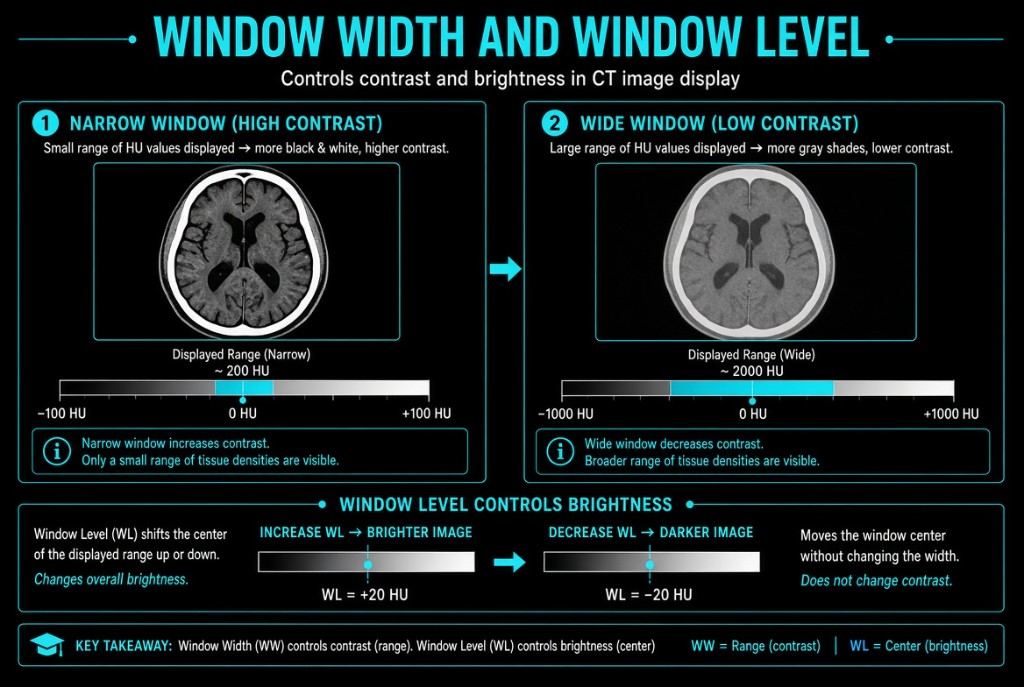
Window level and window width are the two main display controls at a workstation. Window level, also called window center, sets the middle pixel value of the displayed range and controls brightness. Window width sets how many pixel values are spread between pure white and pure black and controls contrast. Both act only on the display, not on the stored data or the patient's dose.
Window Width and Window Level
How it works
Window level and brightness are inversely related on most systems. Raising the level makes the image darker, and lowering it makes the image brighter. Window width and contrast are also inversely related. A narrow width spreads a small range of values across the full gray scale, so small differences look large and contrast is high. A wide width squeezes many values into the same gray scale, so contrast is lower and more tissue types are visible at once.
The numbers
Picture pixel values from 0 to 4,095. With a level of 2,000 and a width of 1,000, the display covers 1,500 to 2,500. Values below 1,500 all show as one extreme, and values above 2,500 show as the other, with no detail within them. Narrow the width to 500 at the same level and the display covers only 1,750 to 2,250. Contrast rises, but more of the image is pushed to pure black or white.
On the job
Narrow the width to bring out a subtle fracture line or trabecular detail. Widen it on a chest to show lungs and mediastinum together. Adjust the level when the whole image is too bright or too dark. Windowing cannot add information that was never captured. A noisy, underexposed image stays noisy, and saturated areas of a badly overexposed image hold no detail to bring back.
Clinical Example
A radiologist reviewing an ankle asks you to look for a faint fibular fracture. You narrow the window width and adjust the level until the cortex is crisp, and the fracture line becomes obvious. Widening the width again shows soft-tissue swelling over the lateral malleolus.
Common Mistakes
- Mixing up the controls; level is brightness and width is contrast.
- Thinking a wider window width increases contrast, when it decreases it.
- Believing windowing changes the stored data or the patient's dose.
- Expecting windowing to rescue a noisy, underexposed image.
Why It Matters
Windowing lets one exposure show both bone and soft tissue without another dose. The registry tests which control affects brightness or contrast and the direction of each change.
Key Relationships
- Raise window level → darker image
- Lower window level → brighter image
- Narrow window width → higher contrast, fewer gray shades
- Wide window width → lower contrast, more gray shades