
Image Production · Exposure and contrast2 min read5-question check
Quantum Mottle
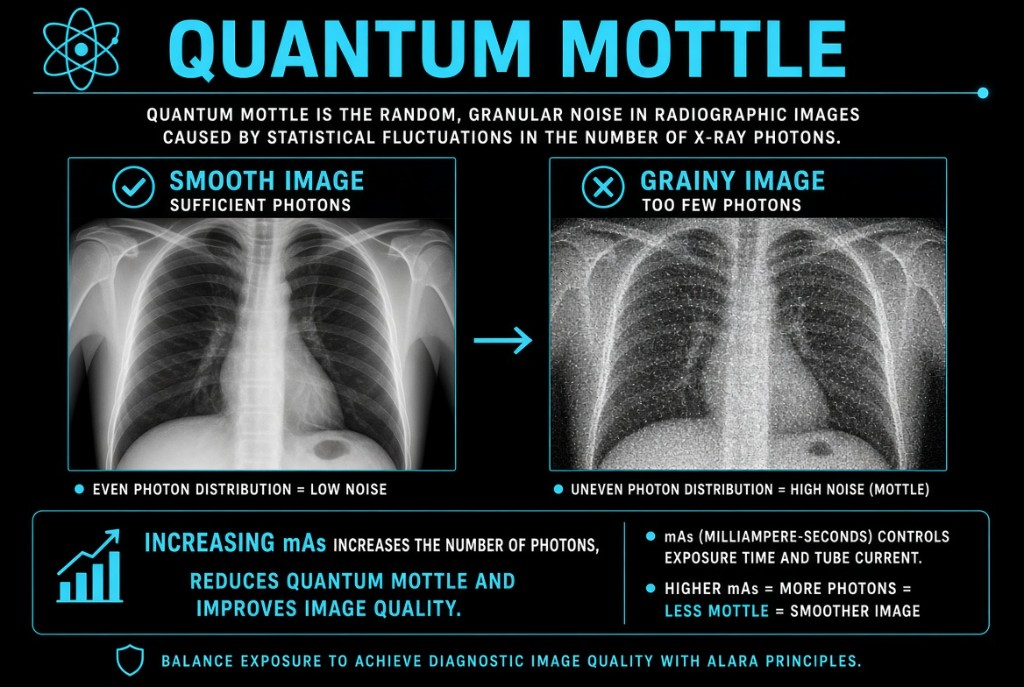
Too few photons at the detector make a grainy image. More mAs is the direct fix; post-processing is not.
The rule
Quantum mottle, also called quantum noise, is the grainy, speckled look of an image made with too few x-ray photons reaching the detector. It is the most common kind of noise in digital radiography. It is a receptor exposure problem, so the fix happens at the control panel, not at the workstation.
Quantum Mottle
Why it happens
X-ray photons arrive at random, like raindrops on a sidewalk. When millions land on every area, the random differences even out and the image looks smooth. When only a few land, some areas get more and some get fewer by chance, and that unevenness shows up as grain. Digital rescaling makes it worse to see: the system brightens an underexposed image to normal display levels, so it looks fine at a glance but the grain is still there.
The numbers
Visible noise depends on the square root of the photon count. To cut the visible noise in half, you need four times as many photons. Worked example: a knee shows mottle and a deviation index of minus 3, meaning about half the target exposure. Doubling the mAs, from 5 to 10 mAs, brings the exposure back to target. A 15% increase in kVp also gets more photons through the part, but mAs is the direct control of photon quantity.
On the job
Check the exposure indicator before you judge the image. A low exposure indicator or a negative deviation index with a grainy image points to quantum mottle. Noise-reduction filters can smooth the look, but they also blur fine detail. Do not overcorrect: an image does not need to be noise-free, only diagnostic.
Clinical Example
A portable abdomen on a large patient comes back grainy, and the deviation index reads minus 4. The technologist had used the same technique as for an average patient. She repeats with more mAs and a modest kVp increase, and the bowel gas pattern is now clear.
Common Mistakes
- Trying to fix mottle by adjusting window width or level, which changes display but adds no photons.
- Assuming the image is fine because its brightness looks normal after rescaling.
- Raising mAs far beyond what is needed, which trades noise for unnecessary dose.
- Confusing quantum mottle with grid lines or a detector artifact.
Why It Matters
Mottle hides low-contrast detail like subtle fractures and soft tissue edges. The registry tests its cause, too few photons, and its fix, more mAs, often alongside exposure indicators.
Key Relationships
- Fewer photons at the detector → more quantum mottle
- Increase mAs → more photons → less mottle
- 4 times the photons → noise cut in half
- Windowing changes appearance, not photon count