
Image Production · Digital imaging and processing2 min read5-question check
Look-Up Tables
A LUT maps raw pixel values to display gray shades. It sets the image's contrast look, not its dose or signal.
The rule
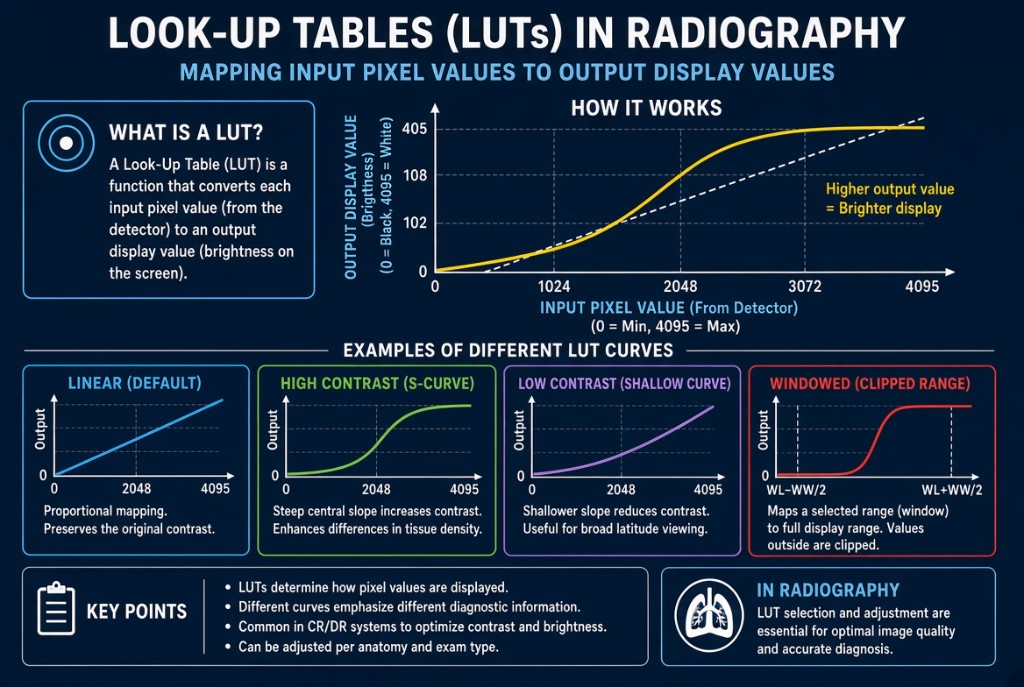
A look-up table, or LUT, is a stored conversion chart that tells the computer which gray shade to display for each pixel value. The detector records a wide range of raw values. The LUT turns them into the brightness levels you see on the monitor. Each exam type has its own LUT, selected when you choose the body part and projection.
Look-Up Tables
How it works
LUTs are applied after histogram analysis and rescaling. Once the system has found the values of interest and placed them in a standard range, the LUT gives the image its final contrast character. You can picture a LUT as a curve, with raw values along the bottom and displayed brightness up the side. Window width and window level adjustments at the workstation work by changing this display mapping.
Reading the image
The slope of the LUT curve controls displayed contrast. A steep slope spreads a small range of raw values across many display shades, so differences stand out: high contrast with fewer grays. That suits a bone exam such as an extremity. A flatter slope shows more shades of gray with lower contrast, which suits a chest, where lungs, mediastinum, and ribs all need to be seen. An inverted LUT reverses the gray scale so bone appears dark, which some radiologists use to look for lines and tubes.
The limit
A LUT only changes how the data are shown. It cannot add signal to an underexposed image or remove noise. If the wrong exam menu is chosen, the wrong LUT is applied and the image can look too contrasty or too flat even with perfect technique; reprocessing under the correct menu fixes this without re-exposing. Correct technique always comes first.
Clinical Example
A lateral C-spine is processed under a chest menu. The vertebrae look flat and gray. The technologist reprocesses the image under the cervical spine menu, and the bone edges and joint spaces now show clear contrast.
Common Mistakes
- Thinking a different LUT can rescue an underexposed, noisy image.
- Assuming LUT changes alter patient dose.
- Selecting a general menu, which may apply an unsuitable LUT.
- Confusing a LUT with the histogram; the histogram analyzes data, the LUT maps it for display.
Why It Matters
The right LUT gives each exam the contrast the radiologist expects. The registry tests what LUTs do, how slope relates to contrast, and why the anatomic menu matters.
Key Relationships
- Steeper LUT slope → higher displayed contrast
- Flatter LUT slope → lower contrast, more gray shades
- Exam menu selection → which LUT is applied
- LUT changes display only, never dose or signal