
Image Production · Digital imaging and processing2 min read5-question check
Histogram Analysis Errors
When the computer misreads the histogram, brightness and the exposure indicator go wrong. Fix the cause.
The rule
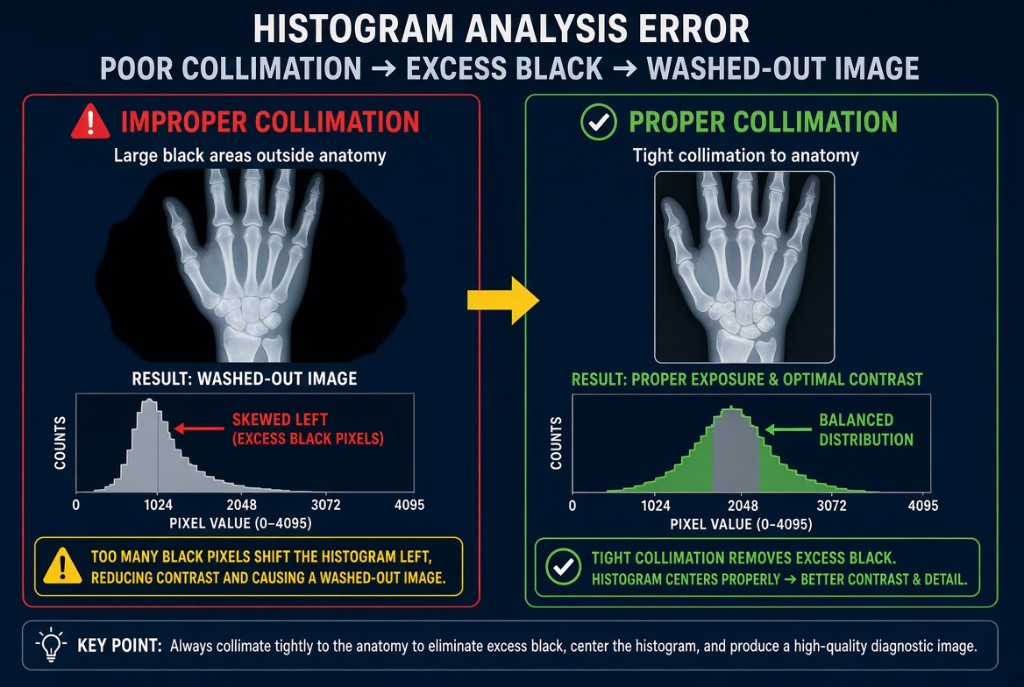
After every exposure, the digital system builds a histogram, a graph of how many pixels fall at each exposure value. It finds the values of interest that belong to the anatomy and compares them with a stored reference histogram for the exam you selected. Then it rescales the data so the image displays at a standard brightness. A histogram analysis error happens when the system picks the wrong values of interest.
Histogram Analysis Error
How it works
The system expects a certain shape. A hand, for example, should show a range of values for bone and soft tissue, with collimated edges outside the anatomy. When something unexpected is in the data, such as a large area of raw beam, the computer may include it in its analysis. The rescaling is then based on the wrong range, and the displayed image comes out too bright, too dark, or flat in contrast. The exposure indicator is calculated from the same values of interest, so it becomes unreliable too.
The causes
The most common causes are poor collimation with a lot of unattenuated beam, collimation edges the system cannot find, large metal objects such as prostheses, the part placed far off center, and selecting the wrong body part or projection on the workstation. Very high scatter and extreme over- or underexposure can also confuse the analysis.
The fix
Find the cause before changing technique. If the wrong exam was selected, many systems let you reprocess the same raw data under the correct menu, which fixes the image without a new exposure. If the cause was collimation or centering and the image is not diagnostic, correct it and repeat with the same technique, because the exposure itself was not the problem. Raising mAs to fix a histogram error only adds dose.
Clinical Example
A PA hand with wide-open collimation displays with poor brightness and flat contrast, and the exposure indicator is far out of range. The technologist recognizes the raw beam around the hand, collimates to the hand and wrist, and repeats with the same factors. The second image displays normally with an indicator in range.
Common Mistakes
- Increasing mAs in response to a histogram error caused by poor collimation.
- Trusting the exposure indicator on an image with a histogram error.
- Repeating the exposure when reprocessing under the correct body part would fix it.
- Choosing a general exam menu out of habit instead of the specific part.
Why It Matters
Histogram errors lead to repeats and wrong technique decisions, both of which raise dose. The registry tests the causes, the unreliable indicator, and the correct fix.
Key Relationships
- Raw beam in the values of interest → wrong rescaling
- Wrong anatomic menu → wrong reference histogram
- Histogram error → unreliable exposure indicator
- Wrong menu only → reprocess, do not re-expose